Nexus UI
v0.3.0 Open source under the MIT licence

A UI framework built for FiveM resources.

Write screens in .nexus files and declare every message between the page and Lua once. The page costs nothing while it is closed, and the server only sees input it has already validated.

npm create nexus-ui my_shop
  • Standalone Lua
  • Next to ESX, QBCore or Qbox
  • Apps for LB Phone and LB Tablet
  • Built for Chromium 103
Main.nexus
---import { signal, nui, NuiError } from 'nexus';const amount = signal(1);const notice = signal('');async function buy() {  try {    const input = { item: props.item, amount: amount.value };    const result = await nui.call('shop:buy', input);    notice.value = `Balance: $${result.balance}`;  } catch (error) {    const refusal = error instanceof NuiError ? error.message : error;    notice.value = `Refused. ${refusal}`;  }}---<screen focus="mouse keyboard" close="escape" /><section class="shop" class:busy={nui.pending('shop:buy')}>  <h1>{props.item}</h1>  <input type="number" bind:value={amount}>  <button on:click={buy}>Buy for ${props.price * amount.value}</button>  {#if notice}    <p>{notice}</p>  {/if}</section><style>  .shop {    position: absolute;    top: 50%;    left: 50%;    display: grid;    gap: 12px;    width: 260px;    padding: 22px;    transform: translate(-50%, -50%);    border: 1px solid rgba(255, 255, 255, 0.07);    border-radius: 20px;    background: #111113;    color: #f5f5f5;    font: 500 15px/1.4 'Inter', system-ui, sans-serif;  }  .shop.busy { opacity: 0.6; }  h1 { margin: 0; font-size: 22px; }  input, button {    height: 44px;    border-radius: 12px;    font: inherit;  }  input {    padding: 0 14px;    border: 1px solid rgba(255, 255, 255, 0.12);    background: #1a1a1e;    color: inherit;  }  button {    border: 0;    background: #c8ff3d;    color: #0b1400;    font-weight: 600;    cursor: pointer;  }  p { margin: 0; color: #a1a1aa; font-size: 14px; }</style>
Result Nexus.open('main', { item = 'Water', price = 5 })

Water

1
Buy for $5

Run it swaps the picture for the sandbox: the real compiler and runtime in your browser, with a mock in place of the game. This is live. Change the code, or ask for 500 and see the contract refuse it before the handler runs. Open the playground

signal
A value the template follows. When it changes, the one node that shows it changes, and nothing else runs.
nui.call
Typed by the contract. The server validates the input and applies the rate limit before your handler runs.
<screen>
Focus and Escape, declared in the file. No Lua calls SetNuiFocus.
Why

What a NUI leaves to you, and what it becomes

A NUI is a web page in a browser from 2022, talking to a game through untyped messages, on a server where any client may be hostile. The usual stack leaves each of those to the resource author. Nexus UI takes them on as the framework's job.

  1. 01 Typos in messages
  2. 02 Server events
  3. 03 Focus and Escape
  4. 04 Idle cost
  5. 05 Chromium 103
  6. 06 Phone apps
  7. 07 Working without the game

A typo in a message is found in game

The page and Lua agree on message names and shapes by convention. With a contract, every message is declared once, and nui is typed from it: a wrong name, a missing key or a misspelt field is a type error.

Today

web/app.js
// The page sends a message. Nothing checks its name or its shape.fetch(`https://${GetParentResourceName()}/buyItem`, {  method: 'POST',  body: JSON.stringify({ item: 'water', ammount: 2 }),});
client/main.lua
RegisterNUICallback('buyItem', function(data, cb)    -- data.amount is nil, and nobody is told.    TriggerServerEvent('shop:buy', data.item, data.amount)    cb({})end)

Nothing fails until someone presses the button in game, and then nothing happens.

With Nexus UI

web/contract.ts
import { contract, s } from 'nexus/contract';export default contract({  calls: {    'shop:buy': {      input: s.object({        item: s.string({ max: 40 }),        amount: s.int({ min: 1, max: 100 }),      }),      output: s.object({ ok: s.boolean(), balance: s.int() }),      rate: { limit: 5, per: 10 },    },  },});

Found before the game starts, with the file, the line and the fix.

Terminal
$ npx nexus checkerror web/screens/Shop.nexus:13:65: Object literal may only specify known properties, but 'ammount' does not exist in type '{ item: string; amount: number; }'. Did you mean to write 'amount'? (TS2561)  11 |  12 | async function buy() {> 13 |   const result = await nui.call('shop:buy', { item: props.item, ammount: amount.value });     |                                                                 ^  14 |   balance.value = result.balance;  15 | }error nexus check found 1 error.

nexus check reports type errors at their line in the .nexus file. In a .ts module the editor shows them as you type. There is no language server for .nexus files yet: see the roadmap.
A server event trusts whatever arrives

A player controls their own client and can trigger any server event with any value. The contract becomes plain Lua validators and a rate limit that run on the server before your handler does.

Today

server/main.lua
RegisterNetEvent('shop:buy', function(item, amount)    local player = source    -- Is item a string? Is amount a whole number above zero?    -- How often may one player send this? Every event has to    -- answer that by hand, and many do not.    local price = Prices[item] * amount    if GetMoney(player) >= price then        RemoveMoney(player, price)        GiveItem(player, item, amount)    endend)
an injected script
-- Any client can trigger the event with any value.TriggerServerEvent('shop:buy', 'water', -1000)

The handler runs with whatever arrived: here, a negative price.

With Nexus UI

nexus/contract.lua generated
['shop:buy'] = {    limit = 5,    per = 10,    input = function(v)        if not isTable(v) or v[1] ~= nil then return false, 'expected an object' end        for k0 in pairs(v) do            if not keys[1][k0] then return false, unknownKey('', k0) end        end        do            local v1 = v.item            if type(v1) ~= 'string' then return false, 'item: expected a string' end            local n1 = utf8len(v1)            if not n1 then return false, 'item: expected well-formed text' end            if n1 > 40 then return false, 'item: expected at most 40 characters' end        end        do            local v1 = v.amount            if not isInt(v1) then return false, 'amount: expected an integer' end            if v1 < 1 then return false, 'amount: expected at least 1' end            if v1 > 100 then return false, 'amount: expected at most 100' end        end        return true    end,
server/main.lua
Nexus.handle('shop:buy', function(source, data)    -- data has passed the contract: a table with item and amount, and nothing else.    local price = prices[data.item]    if not price then        return Nexus.reject('unknown_item')    end    if not removeMoney(source, price * data.amount) then        return Nexus.reject('not_enough_money')    end    return { ok = true, balance = getMoney(source) }end)

Refused before the handler runs. The caller is told why.

What each caller gets back nexus dev
call shop:buy {"item":"water","amount":2} ok {"ok":true,"balance":110} (1 ms)
call shop:buy {"item":"water","amount":-1000} invalid: amount: expected at least 1 (0 ms)
call shop:buy {"item":"water","amount":2,"price":0} invalid: unknown key "price" (0 ms)
call shop:buy {"item":"water","amount":"2"} invalid: amount: expected an integer (0 ms)
call shop:buy {"item":"water","amount":1} ok {"ok":true,"balance":115} (0 ms)
call shop:buy {"item":"water","amount":1} rate_limited (0 ms)

Live Buy more than the balance allows, or click faster than the rate limit: the call is refused. Open in the playground

The lines are from the bridge log of nexus dev, where the mock refuses with the codes and messages of the server. The contract checks shape, range and rate. Whether this player may buy this item is still for the handler to decide, from what the server knows: see the security model.

Focus, the cursor and Escape are rewritten in every resource

A screen declares in its own file what it takes from the player and how it closes. The build writes that down for Lua, and the client runtime gives and releases focus as screens open and close.

Today

client/main.lua
local open = falseRegisterCommand('shop', function()    open = true    SetNuiFocus(true, true)    SendNUIMessage({ action = 'open', item = 'water', price = 5 })end, false)RegisterNUICallback('close', function(_, cb)    open = false    SetNuiFocus(false, false)    cb({})end)-- Without this, a restart while the shop is open-- leaves the player with a cursor nothing dismisses.AddEventHandler('onResourceStop', function(resource)    if resource == GetCurrentResourceName() and open then        SetNuiFocus(false, false)    endend)
web/app.js
window.addEventListener('keydown', (event) => {  if (event.key !== 'Escape') return;  fetch(`https://${GetParentResourceName()}/close`, { method: 'POST' });});

Every resource keeps this bookkeeping, and one missed case is a stuck cursor.

With Nexus UI

web/screens/Shop.nexus
<screen focus="mouse keyboard" close="escape" size="1920x1080" /><section class="shop">  ...</section>
client/main.lua
RegisterCommand('shop', function()    Nexus.open('shop', { item = 'water', price = 5 })end, false)
nexus/screens.lua generated
NexusScreens = {    shop = { layer = 'screen', mouse = true, keyboard = true, keepInput = false, escape = true },}
  • The screen opened last that asks for focus has it. When it closes, focus goes back to the one before, or to the game.
  • Escape closes one screen at a time, and the pause menu is kept shut for a quarter of a second after it.
  • A screen on the hud layer never takes focus.

One tag. Focus follows the screens that are open, and is released when the resource stops.

A closed UI still costs

A screen's code is loaded when it is first opened, and its nodes are removed when it closes. State is patched, not resent: Nexus.set compares with what it sent before and sends only the keys that changed.

Today

client/main.lua
-- Ten times a second, every value, changed or not.CreateThread(function()    while true do        SendNUIMessage({            action = 'hud',            speed = speed,            fuel = fuel,            engine = engine,            street = street,        })        Wait(100)    endend)
web/main.jsx
// Mounted when the resource starts and hidden with CSS.// The framework and every component stay loaded and keep// listening, whether or not a menu is ever opened.createRoot(document.getElementById('root')).render(<App />);

A parked car still sends ten messages a second, and a closed menu still holds its framework.

With Nexus UI

client/main.lua
CreateThread(function()    Nexus.open('hud')    while true do        local vehicle = GetVehiclePedIsIn(PlayerPedId(), false)        if vehicle ~= 0 then            Nexus.set('hud', {                speed = math.floor(GetEntitySpeed(vehicle) * 3.6),                fuel = math.floor(math.min(GetVehicleFuelLevel(vehicle), 100.0)),            })        end        Wait(100)    endend)
web/screens/Hud.nexus
---import { nui } from 'nexus';const hud = nui.state('hud');---<screen layer="hud" size="1920x1080" /><div class="speed">{hud.speed}</div><div class="fuel" style:width="{hud.fuel}%"></div>

A parked car sends nothing. With nothing open, the page has no nodes and runs nothing.

What crosses the bridge for a moving car nexus dev
state hud {"speed":24} 15 updates
state hud {"speed":30} 4 updates
state hud {"speed":43} 8 updates
state hud {"fuel":52} 356 updates

Live A HUD fed by state, which the mock changes on a timer as the game would. Open in the playground

Each line is a patch with the keys that changed, never the whole state. In the page, only the node that shows a changed key updates. The details are in the guide.

It works in Chrome and fails in game

FiveM's browser is Chromium 103. CSS it does not know is silently ignored there, and a missing JavaScript function throws, while both work in the browser you develop in. Newer syntax is not a problem: the build rewrites it.

Today

web/style.css
.card {  background: color-mix(in srgb, #c8ff3d 12%, transparent);}/* Chromium 103 does not know :has() and drops the rule. */.list:has(.selected) {  gap: 12px;}
web/app.js
// Works in the browser you develop in. Throws in game.const sorted = items.toSorted((a, b) => a.price - b.price);

Nothing warns you in the browser you develop in. In game the layout is wrong, or the script throws.

With Nexus UI

web/screens/Shop.nexus
---import { computed, signal } from 'nexus';const selected = signal('');const sorted = computed(() =>  [...props.items].sort((a, b) => a.price - b.price),);---<ul class="list" class:picked={selected.value !== ''}>  ...</ul><style>  .card {    background: rgb(200 255 61 / 12%);  }  .list.picked {    gap: 12px;  }</style>
Terminal
$ npx nexus checkok 1 component checked, no errors.

Refused by the check and by the build, with what to write instead.

What the check said about the first version
$ npx nexus checkerror web/screens/Shop.nexus:14:42: This array method needs Chromium 110. FiveM runs Chromium 103. (unsupported-api)  12 |  13 | const selected = signal('');> 14 | const sorted = computed(() => props.items.toSorted((a: Item, b: Item) => a.price - b.price));     |                                          ^^^^^^^^^^  15 | ---  16 |Copy the array first: `[...list].sort()`, `[...list].reverse()`, `list.slice()` then `splice`.error web/screens/Shop.nexus:27:17: `color-mix()` needs Chromium 111. FiveM runs Chromium 103. (unsupported-css)  25 | <style>  26 |   .card {> 27 |     background: color-mix(in srgb, #c8ff3d 12%, transparent);     |                 ^^^^^^^^^^  28 |   }  29 |Write the colour as `rgb()`, `hsl()` or hex. For transparency, `rgb(255 0 0 / 50%)` works.error web/screens/Shop.nexus:30:8: `:has()` needs Chromium 105. FiveM runs Chromium 103. (unsupported-css)  28 |   }  29 |> 30 |   .list:has(.selected) {     |        ^^^^^  31 |     gap: 12px;  32 |   }Set a class with `class:name={condition}` and style that class.error nexus check found 3 errors.

The list of what is caught, and what is not, is in the format reference and the roadmap: new DOM methods are only caught from a fixed list.

A phone app is a second build and a second bridge

A screen with surface="phone" or surface="tablet" is an app in LB Phone or LB Tablet. Calls, pushes, state and strings work in it as in any screen.

Today

client/phone.lua
-- A second page, built on its own, registered by hand.local resource = GetCurrentResourceName()local function addApp()    exports['lb-phone']:RemoveCustomApp('my_shop')    exports['lb-phone']:AddCustomApp({        identifier = 'my_shop',        name = 'Shop',        ui = resource .. '/phone/index.html',        icon = 'https://cfx-nui-' .. resource .. '/phone/icon.png',    })endif GetResourceState('lb-phone') == 'started' then addApp() end-- LB Phone restarted: the app is gone until it is added again.AddEventHandler('onClientResourceStart', function(started)    if started == 'lb-phone' then addApp() endend)AddEventHandler('onResourceStop', function(stopped)    if stopped == resource then        exports['lb-phone']:RemoveCustomApp('my_shop')    endend)-- And a second way to reach the page, next to SendNUIMessage.exports['lb-phone']:SendCustomAppMessage('my_shop', {    action = 'stock',})

Two pages to build, two ways to send a message, and registration to keep alive by hand.

With Nexus UI

web/screens/ShopApp.nexus
---import { nui, t } from 'nexus';const hud = nui.state('hud');---<screen surface="phone" /><main class="app">  <h1>{t('app.title')}</h1>  <p>{hud.fuel}%</p></main>
client/main.lua
Nexus.app('phone', {    name = 'My shop',    description = 'Order from anywhere',    icon = 'web/dist/app-icon.png',    defaultApp = true,})

The same build and the same contract. On a server without LB Phone the line does nothing.

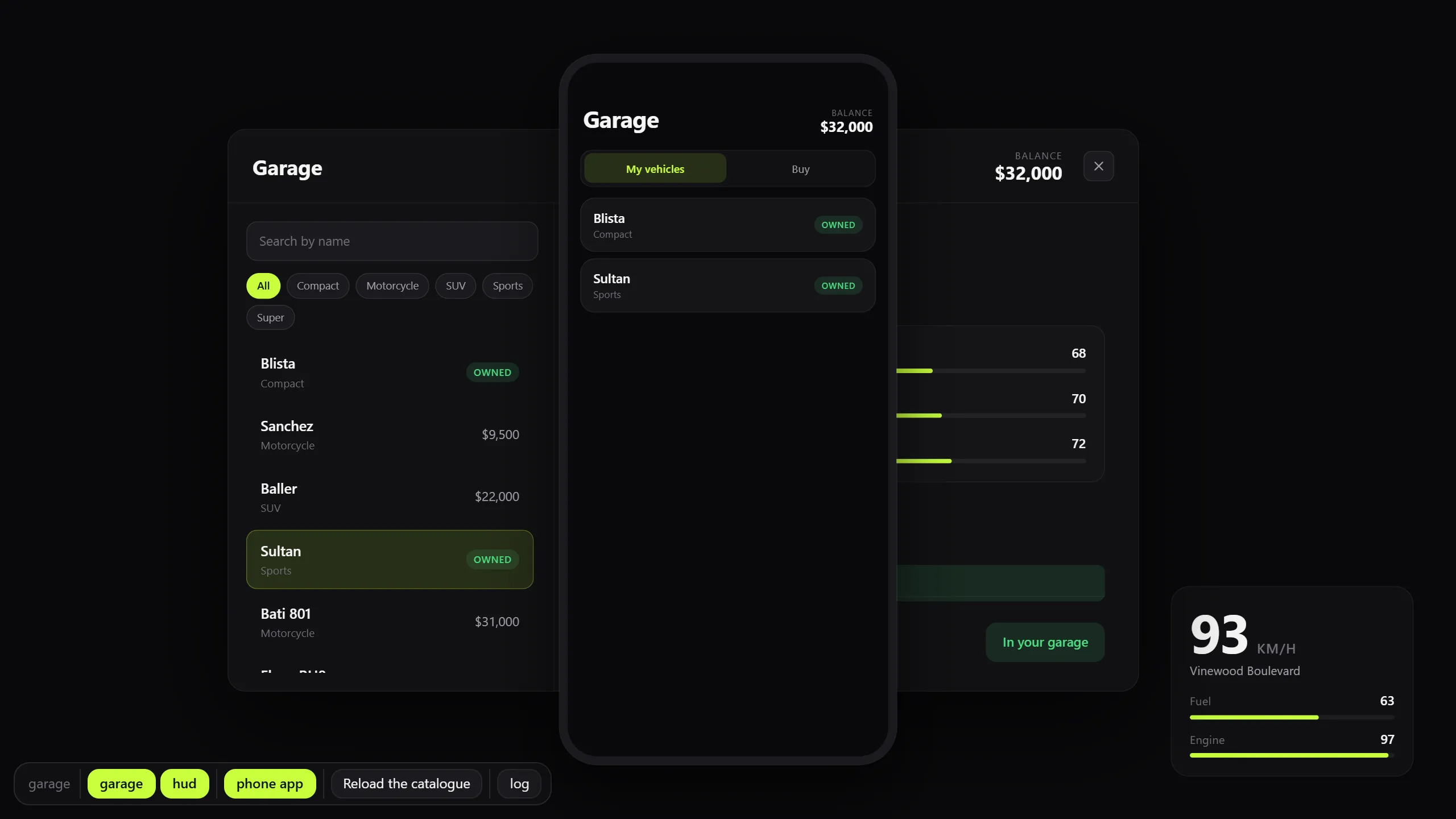
The garage example in a browser, with its LB Phone app shown in a phone frame over the garage screen
The example resource under nexus dev: its phone app in a frame of the size LB gives it, fed by the same mock.

Every change needs the game

nexus dev runs the page in a browser with a mock in place of the game. The mock enforces the contract exactly as the Lua side does, with the same codes and the same messages. The game is needed to test the Lua.

Today

the loop
# change one colour in the page, then:npm run buildensure my_shop      # in the server console/shop               # in game: open the menu again# look at it, switch back to the editor, repeat

A restart and a walk back to the menu for every change.

With Nexus UI

Terminal
$ npm run devok my_shop is running at http://localhost:5173/   Open it in a browser. The bar at the bottom opens the screens with the props from web/mock.ts.   Press Ctrl+C to stop.

Save the file. The open screen is mounted again in place, with the props it had.

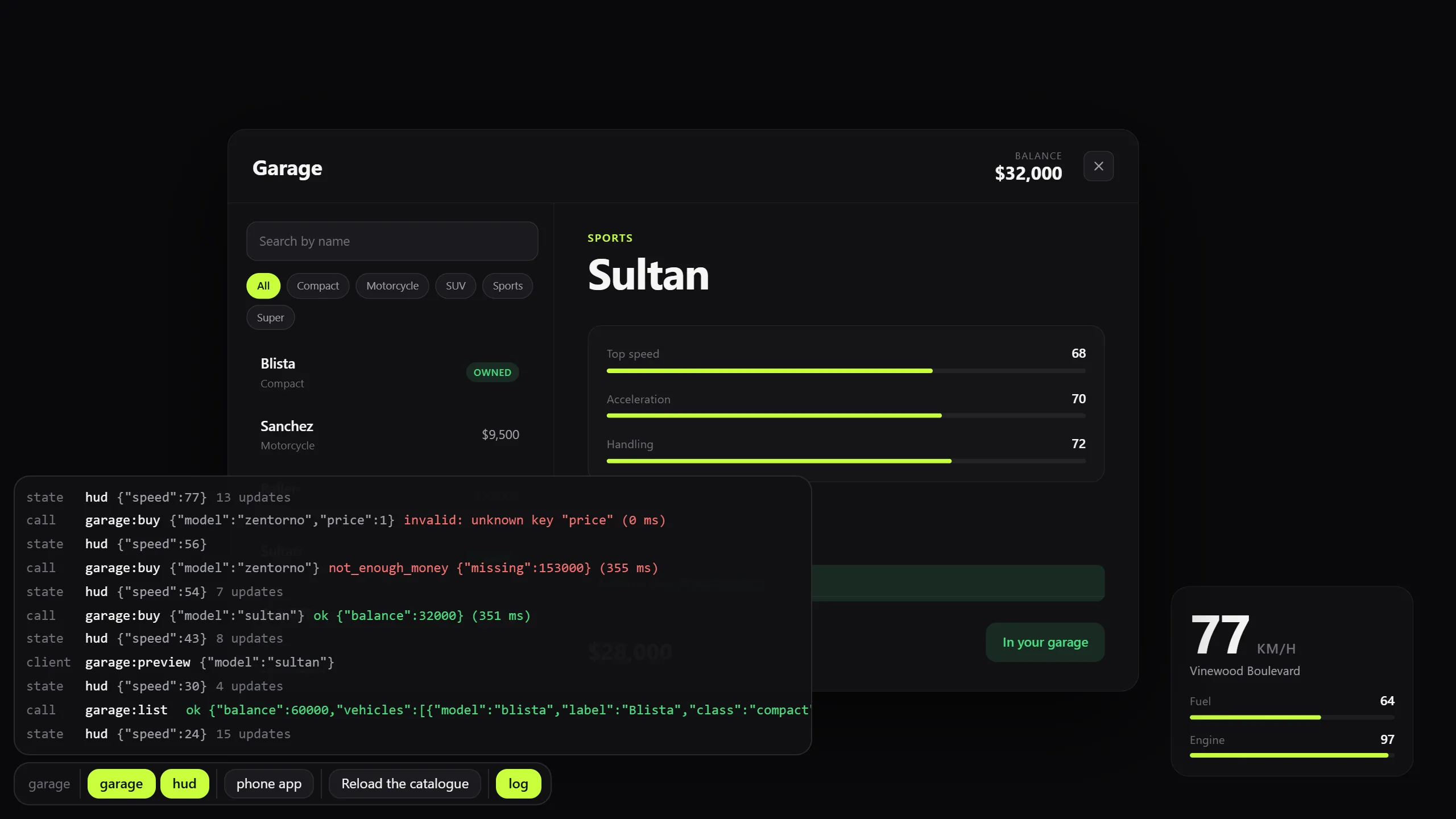
The garage example in a browser under nexus dev: the garage screen, a vehicle HUD, the toolbar, and the bridge log listing calls with their answers and refusals
The toolbar opens screens with the props from the mock. The log shows what crossed the bridge: an accepted purchase, one the handler refused, and one the contract refused.
How it works

Three files, and nothing between them to keep in step

A feature is a screen, the messages it exchanges, and the Lua that answers. The contract sits in the middle: the types of the page and the validators of the server are both written from it.

  1. 1

    Write a screen

    A .nexus file holds TypeScript, markup and scoped CSS. The compiler turns it into a small module that updates the DOM directly: there is no virtual DOM, and the script runs once.

    The .nexus format
    web/screens/Shop.nexus
    ---import { signal, nui, t } from 'nexus';interface Props {  item: string;  price: number;}const amount = signal(1);async function buy() {  const input = { item: props.item, amount: amount.value };  const { balance } = await nui.call('shop:buy', input);}---<screen focus="mouse keyboard" close="escape" size="1920x1080" /><section class="shop" class:busy={nui.pending('shop:buy')}>  <h1>{t('shop.title')}</h1>  <input type="number" bind:value={amount} min="1">  <button on:click={buy}>{t('shop.buy')}</button></section><style>  .shop.busy { opacity: 0.6; }</style>
  2. 2

    Declare the contract

    Every call, push, client message, state and screen is declared once. From that file come the types of nui in the page, the Lua validators and rate limits on the server, and the checks of the browser mock.

    The contract
    web/contract.ts
    import { contract, s } from 'nexus/contract';export default contract({  calls: {    'shop:buy': {      input: s.object({        item: s.string({ max: 40 }),        amount: s.int({ min: 1, max: 100 }),      }),      output: s.object({ ok: s.boolean(), balance: s.int() }),      rate: { limit: 5, per: 10 },    },  },});
  3. 3

    Handle it in Lua

    The server answers the call and client Lua opens the screen. The Lua side is standalone: it needs no framework and no library, and runs next to ESX, QBCore, Qbox or nothing.

    The Lua API
    server/main.lua
    Nexus.handle('shop:buy', function(source, data)    -- data is { item = string, amount = 1..100 } and nothing else.    -- The contract saw to that.    return { ok = true, balance = 120 }end)
    client/main.lua
    RegisterCommand('shop', function()    Nexus.open('shop', { item = 'water', price = 5 })end, false)
    Terminal
    $ npm run buildok web/dist (4 files)ok nexus/contract.lua, nexus/screens.lua, nexus/client.lua, nexus/server.luaok fxmanifest.lua loads the bridge and ships web/dist
In numbers

The numbers, and where they come from

6 KB of runtime
Minified and gzipped: 6,127 bytes without the bridge and 6,883 with it. A test fails when the runtime outgrows its budget.
790 tests
Across the compiler, the runtime, the contract, the command line and both Lua runtimes, which run in a real Lua 5.4.
103 the Chromium it builds for
The browser FiveM embeds. The build targets it, the check knows what it cannot run, and part of the suite runs in it.
0 nodes while closed
With nothing open, the page has no nodes and runs nothing. The client runtime starts no thread while it is idle.
Not yet

What it does not do

This is version 0.2, and it is new. A feature is either in and documented, or it is on the roadmap: nothing is half done in the code. These are the limits you are most likely to meet.

  • No language server

    The VS Code extension highlights .nexus files and has snippets. It does not complete or underline errors: type errors come from nexus check, in the terminal.

  • Nothing drives a game client

    The Lua runtimes are tested in a real Lua 5.4 with stand-ins for the FiveM functions they use, and the example is started on a real server. No test plays the game.

  • No helpers for ESX, QBCore or Qbox

    The runtimes are standalone. A handler calls the framework of the server itself.

  • One app per surface, and only LB

    A resource has at most one phone app and one tablet app, in LB Phone and LB Tablet. No other phone or tablet resource is supported.

  • One answer per call

    A call cannot be cancelled from the page and has no streaming answer. Progress is a push.

  • The contract has edges

    No tuples, no recursive schemas, no binary payloads, and patterns are a subset of regular expressions.

Read the whole roadmap

Start with one command

It creates a complete resource: one screen, one call with its server handler, a mock and a locale. Then npm run dev opens it in a browser.

npm create nexus-ui my_shop

Needs Node.js 20 or newer, and lua54 'yes' in the resource. To add it to a resource that exists already: npm install --save-dev @nexusstudios/ui.